21 May 2026 · 27 min read
Microsoft Copilot Agents vs. Custom AI Solutions: A Manager's Decision Guide
For senior managers and engineering leads who own the AI build-vs-buy decision
Bottom line
The decision in 30 seconds:
-
Pick Copilot Studio when data lives in Microsoft 365, the audience is internal, the problem is Q&A or summarisation, and you can ship in days
~60% of "AI assistant" requests fit here -
Build custom when you need row-level security, coordinated multimodal workflows (two or more modalities orchestrated together), large-context reasoning (>50K tokens per query), multi-step agentic workflows, or a defensible audit trail
~25% of requests -
Use MCP servers as a middle path when you need to plug an LLM into a handful of specific systems through a standard tool interface — for example, a sales assistant that pulls live records from Salesforce and looks up contracts in SharePoint, then drafts a renewal email. More flexible than Copilot's fixed connectors, far less work than a full custom pipeline
~15% of requests. -
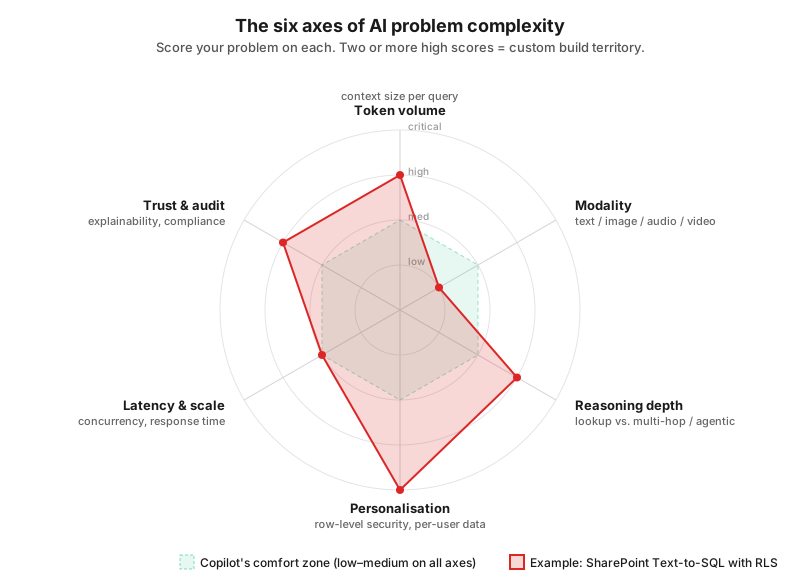
When the choice isn't obvious, score your problem against six complexity axes:
- token volume
- modality
- reasoning depth
- personalisation
- latency/scale
- trust/audit
Two or more high scores → custom build.
-
Invest in evaluation from day one, whichever path you pick. Without a way to programmatically score answers against a known-good test set, you cannot answer "how do you know it's working?" in a production review.
The single biggest mistake managers make is choosing the platform before scoring the problem. Everything that follows in this guide is the scoring framework, the evidence, and the trade-offs.
Why this guide exists
If you sponsor or oversee an AI initiative, you will be asked some version of this question : "Should we just build it in Copilot, or do we need a real engineering project?"
The honest answer is: it depends on the complexity of the problem
A well-scoped problem in Copilot Studio can ship in three days and serve thousands of employees. A poorly-scoped one will absorb six months of effort and still embarrass you in the demo.
This guide gives you a structured way to assess complexity, recognise where Copilot's ceiling sits, and decide when a custom build is genuinely justified.
Foundational concepts (the minimum you need)
You don't need to write Python to make this decision, but you do need to be fluent in four ideas. Skim if you already know them.
1. Tokens — the unit everything is measured in
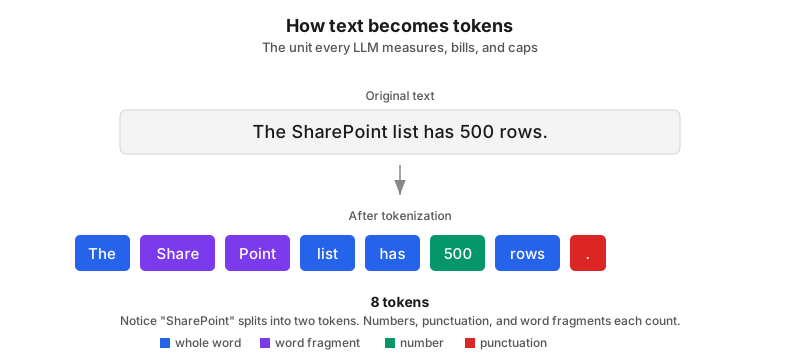
A token is the chunk of text an LLM actually processes. It is not a word, not a character, not a sentence. As a working approximation:
1 token ≈ 4 English characters ≈ 0.75 words
So 1,000 tokens ≈ 750 words ≈ roughly one page of single-spaced text.
Every LLM has a context window — a hard ceiling on the total tokens it can see in one request. The window has to hold everything: your system prompt, the user's question, every document or row you injected for context, and the model's response. If your inputs overflow the window, the model never sees the excess. There is no graceful degradation; the data simply isn't there.
Throughout this document, I express every size limit in tokens
2. Embeddings and retrieval
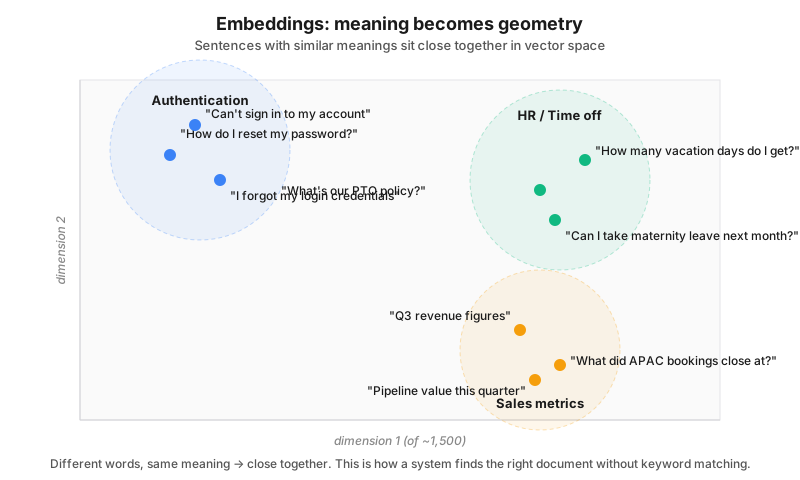
An embedding is a numerical vector that captures the meaning of a chunk of text. For example, "How do I reset my password?" and "I forgot my login credentials" produce vectors that sit close to each other in vector space even though they share no words. This is what powers semantic search: convert a question to a vector, find the closest matches in a vector database, and feed those back into the LLM as context. You'll hear this called RAG (Retrieval-Augmented Generation) when applied to documents, or semantic retrieval more generally — but the core idea is the same in all variants: bring the right context to the model at the right time. Some custom builds are pure RAG; others (like the Text-to-SQL example later in this guide) use retrieval as one component inside a larger pipeline.
3. The evaluation harness — the part most teams skip
An evaluation harness (or "eval harness") is the test suite for your AI system. It is the difference between "we shipped an AI feature" and "we shipped an AI feature we can defend when something goes wrong in production."
A harness consists of:
- A golden dataset — typically 100–500 representative questions paired with the ideal answer or a rubric, curated by people who actually know the domain (legal, HR, finance — whichever business owns the use case).
- Metrics that run automatically — factual accuracy, groundedness (does the citation actually support the claim?), helpfulness, refusal correctness, latency, cost per query.
- A runner — software that fires every question at the system, scores every response, and produces a report.
- Comparison tooling — version vs. version, prompt vs. prompt, model vs. model, so you can answer "is the new version actually better?"
Why a manager should care: AI systems are non-deterministic. A prompt tweak that fixes one user's complaint can silently break ten other behaviours. Without a harness, you find out from angry users, not from your CI pipeline. This is also where Copilot Studio is structurally weaker than a custom build — you can test prompts manually in a side panel, but there is no real programmatic way to run 500 graded evaluations every time a business analyst edits an agent. I'll come back to this.
4. Multimodality
A multimodal model can natively ingest more than one type of input — text plus images, plus tables, plus audio, plus video — in the same prompt. This matters because real organisational data is rarely text-only. Engineering drawings, scanned invoices, screenshots embedded in tickets, sales call recordings, charts inside PDFs — every one of these is a modality that an LLM either handles natively or needs a preprocessing pipeline to deal with.
Understanding complexity — it's not one dimension
Bottom line: Score your problem on six independent axes — token volume, modality, reasoning depth, personalisation, latency/scale, and trust/audit. Each axis is graded low / medium / high. Two or more high scores means you are in custom-build territory. Lower scores mean Copilot or MCP will probably serve. You should evaluate your problem against all six before deciding.
Axis 1: Token volume — how much context does a single answer require?
This is the most under-appreciated axis. Ask: to answer one typical question, how many tokens of supporting context does the model genuinely need to see?
| Context required per query | Examples | Implication |
|---|---|---|
| Under 5,000 tokens (~3 pages) | "Summarise this document." "What's our travel policy?" | Comfortably within Copilot's effective range. |
| 5,000–50,000 tokens (~3–35 pages) | Compare two contracts. Synthesise a project's status from five recent docs. | Possible in Copilot, but retrieval quality starts to matter. |
| 50,000–200,000 tokens (~35–150 pages) | Reason across a full product manual, or a quarter's worth of meeting notes. | You need a flagship model with a large context window. Copilot's underlying allocation is opaque and may not deliver. |
| 200,000+ tokens | Cross-reference a regulatory corpus, or an entire SharePoint of engineering specs. | Custom build territory. You need explicit control over which tokens land in the prompt and which don't. |
Copilot Studio doesn't tell you how its underlying model splits its window between your retrieved data and the system's own scaffolding. For low-volume questions this is fine. For high-volume reasoning it is a constant source of unexplained answer quality drops.
Axis 2: Modality — text only, or something messier?
Copilot Studio agents (the thing this guide is about — where you build an agent for a specific business problem) support multimodal too, but typically by wiring in Azure cognitive services through API call nodes.
Here's what that means in practice:
| Inputs involved | Where a Copilot Studio agent stands |
|---|---|
| Plain text, Word, PowerPoint, basic PDFs | Strong. Native ground. |
| Tables and structured data inside documents | Adequate for display, poor for analysis (no code execution can be done on the fly by CoPilot Studio). |
| Scanned documents and text embedded in images | Supported; OCR and image-text search have improved meaningfully. |
| Image interpretation (diagrams, screenshots, photos of forms) | Possible via vision-capable models (GPT Vision, Azure AI Vision) wired through API nodes. No longer low-code. |
| Audio (call recordings, voice notes) | Possible via Azure Speech Services integration. You build the plumbing. |
| Video | Possible via Azure Video Indexer integration. Heavy plumbing. |
| Mixed: e.g. "this PDF contains text, tables, embedded charts, and a scanned signature page" | Each modality has a Microsoft-provided service for it; coordinating them in one workflow is what gets hard and token heavy. |
So the honest assessment: Copilot Studio can technically handle every modality on this list. Microsoft has spent the last year closing this gap. The question is no longer "can it?" but "at what point does the low-code premise break down?" — and the answer is usually around the second or third Azure service you have to call from inside your agent. Once you're orchestrating Vision + Speech + retrieval + custom logic across API nodes, you have effectively written a custom application with the worst possible IDE. At that point, a real custom build is cleaner, more testable, and easier to evaluate.
See "Runtime constraints — what bites when you chain external services" like 100s timeout, synchronous-only calls, 28 KB payload caps and conversation state limits make these multimodal chains painful in practice. Those constraints are the architectural reason custom often wins on multimodal problems, more so than any single modality limitation.
Axis 3: Reasoning depth — one hop or many?
How many distinct steps of reasoning does a single user question require?
- Single-hop ("lookup"): "What does our maternity leave policy say?" → one retrieval, one LLM call. Copilot is excellent here.
- Two- or three-hop ("synthesis"): "Compare our maternity policy with the industry benchmark and flag gaps." → multiple retrievals, one or two LLM calls. Copilot can do this, sometimes well, sometimes not.
- Multi-hop agentic ("plan and act"): "Find every contract expiring in the next 90 days, check which ones have auto-renewal clauses, and draft renewal-decision emails to the relevant account owners." → multiple tool calls, conditional branching, state across steps. Copilot's orchestration cannot do this cleanly. You want a custom agent or, at minimum, a serious orchestration framework.
Axis 4: Personalisation and access control
Does every user see the same answer to the same question, or does the answer depend on who's asking?
If access is binary (you have access to the SharePoint site or you don't), Copilot's permission model handles it but if the access is row-level ("Sales managers see only their region's data; the VP sees everything; HR sees a redacted view") — Copilot has no native mechanism for this. The agent treats whatever it can read as one knowledge pool. Row-level security is a custom-build trigger almost on its own.
Axis 5: Latency, scale, and concurrency
For an internal Q&A bot used by 200 employees occasionally, Copilot's rate limits (50–100 requests per minute on standard tiers) are fine. For a customer-facing assistant or a high-traffic internal tool, those limits become a planning constraint, not an afterthought. Custom solutions let you size for your actual concurrency and choose models that match your latency budget (smaller models for sub-second response, larger ones for batch jobs).
Axis 6: Trust, audit, and compliance
Ask these questions, in order:
- If the AI gives a wrong answer, what is the cost? (Confused employee? Bad customer call? Regulatory penalty? Patient harm?)
- Do users need to see citations for every claim?
- Do you need to log every prompt and response for audit?
- Are you in a regulated industry where the model's outputs need to be explainable?
- Does data residency matter? (Some data legally cannot leave a specific geography.)
The higher you score on these, the harder it is to use Copilot, because you are fundamentally outsourcing the model, the indexing, and most of the observability to a managed service. A custom build lets you log everything, control where data sits, run guardrails on inputs and outputs, and produce the audit trail compliance will eventually ask for.
Option 1: Microsoft Copilot Studio agents
Bottom line: Use it when you need a credible internal Q&A assistant over Microsoft 365 content, fast. Avoid it when you need row-level security, code execution, multi-step orchestration, or more than ~2,000 tokens of instructions and a few thousand rows of structured data. Ship time: hours to days. Effective ceiling: simple-to-moderate complexity.
What it is
Copilot Studio is Microsoft's low-code platform for building AI agents. Visual builder, drag-and-drop, deployable to Teams, web, and mobile, natively connected to the Microsoft 365 graph (SharePoint, Outlook, OneDrive, Dataverse). A business analyst can build a credible agent in an afternoon.
Where it shines
| Scenario | Why |
|---|---|
| Organisation is already on Microsoft 365 | Document ingestion is effortless; permissions inherit automatically. |
| Audience is internal employees | Identity, security, and access already solved. |
| Problem is well-scoped Q&A or summarisation | This is its native strength. |
| You need to ship in days, not months | Realistic. |
| Owners are business users, not engineers | The platform is genuinely usable by power users. |
The ceilings you will hit (standardised in tokens where applicable)
| Limit | Specification | In tokens (where relevant) |
|---|---|---|
| Agent instructions | 8,000 characters | ~2,000 tokens |
| SharePoint lists per session | 15 | n/a |
| Rows returned per list query | 2,048 | n/a |
| Knowledge source file size | 512 MB per file | n/a |
| Connector payload (public cloud) | 5 MB | ~1.25M tokens of text if pure text, but file overhead reduces this sharply in practice |
| Connector payload (Government Cloud) | 450 KB | ~110K tokens of text |
| Rate limit (standard tiers) | 50–100 requests / minute | n/a |
| Rate limit (trial) | 10 requests / minute | n/a |
| Context window allocation | Opaque | You cannot see or control how the underlying model's tokens are split between system prompt, retrieved context, and response. |
The opacity of the context window is the most strategically important entry in that table. You cannot optimise what you cannot measure, and Copilot Studio does not expose the measurement.
Runtime constraints — what bites when you chain external services
The configuration ceilings above are easy to find in documentation. The runtime constraints below are not — they don't show up in marketing comparisons, but they bite hard the moment your agent has to do more than one thing in sequence. They are the architectural reason multimodal pipelines, Azure cognitive service chains, and any non-trivial orchestration are painful in Copilot Studio.
Every row in this table is a lever a custom solution gives you and Copilot Studio doesn't:
| Constraint | Copilot Studio behaviour | Custom solution |
|---|---|---|
| External call timeout | Power Automate flows hard-time-out around 100 seconds before responding to the agent. Chain Vision + Speech + retrieval + reasoning and you can blow through this on a single user turn. | You set the timeout. Stream partial results. Run long jobs async and notify when done. |
| Parallelism | Off-box calls are synchronous — the conversation blocks until every call returns. You cannot fan three Vision calls out in parallel and aggregate. Everything is serial. | Async/await, parallel futures, batched requests. Trivial. |
| Conversation state size | Hard cap on variable storage. Microsoft's own guidance: do not store OCR output, audio transcripts, or large JSON blobs in conversation variables. Persist them externally and re-fetch — which means another flow call, which counts against another quota. | Bounded only by your memory and database. |
| Channel payload size | 28 KB message limit on the Omnichannel/ACS channel. Passing an image-analysis result or a transcript chunk between topics can exceed it and fail silently with MessageSizeExceeded. | Whatever your transport allows — typically megabytes. |
| Flow response size | Power Automate flows have a hard limit on what they can return to the agent. Large payloads must be persisted externally and re-fetched. | None — return any payload size your model can handle. |
| Power Platform request quota | Each Power Automate flow call counts against daily request quotas tied to licensing. Heavy multimodal use burns these fast; raising them requires the Copilot Studio Chat Session add-on. | No platform-level quota. You pay your API providers directly, at predictable per-call rates. |
| Observability | Copilot Studio gives no insight into how long off-agent operations take. You debug latency by opening the Power Automate dashboard in a separate window. | One library import (OpenTelemetry, LangSmith, Langfuse, etc.) gives you end-to-end traces across every retrieval, every LLM call, every external API. |
| Error handling | Wired node-by-node. Each external call needs its own error branch on the visual canvas. | One try/except wrapper per logical operation. |
| Underlying Azure rate limits | Default ~10 TPS on most Azure AI Services; tokens-per-minute on Azure OpenAI. Same limits apply to a custom solution, but in Copilot Studio you don't control retry, backoff, or routing. | Same Azure limits, but you control the retry strategy, exponential backoff, and multi-region routing. |
The pattern across the whole table: Copilot Studio doesn't expose the levers a real engineering team uses to build robust integrations. That's fine for a single call with a fast response and a small payload. It becomes the reason multimodal Copilot Studio agents are technically possible but operationally painful — the bottleneck is not "can the agent call Azure?", it's "can it do so within Copilot Studio's runtime constraints when three calls have to chain together inside a 100-second budget?"
If you catch yourself thinking "these limits can be worked around with clever flow design" — yes, up to a point. But that's the moment the low-code premise has broken. You've stopped using Copilot Studio as a visual builder and started using it as a flow engine with worse tooling than a real codebase. That is the architectural signal to switch to a custom build.
Real-world example: where Copilot ran out of road
The 200+ list Text-to-SQL project from the worked example earlier. We attempted Copilot Studio first because the stakeholder wanted "the SharePoint-native answer." Here's what we hit, in order:
- The 15-lists-per-session cap meant we couldn't connect all 200+ sources without splitting the agent in ways the business didn't want.
- Even after splitting, the agent had no mechanism to route a question to the right list — it treated every connected list as one flat haystack.
- There is no native row-level security on list data. Copilot's security model stops at the SharePoint permission level. We had no way to filter rows by user region.
- The 2,048-row return cap meant our larger lists were silently truncated, producing aggregate numbers that were wrong but looked plausible — the worst possible failure mode.
- Because Copilot doesn't execute code, it couldn't run the SQL-equivalent aggregations the business actually needed.
We rebuilt as a custom solution in four weeks. Evaluation scores went from roughly 40% acceptable on the test set to 89%.
Option 2: Custom AI solution
Bottom line: Choose custom when complexity scoring tips you over the line — large per-query context, multimodal data, row-level security, multi-step reasoning, audit requirements. You get full control, no platform caps, and a real eval harness; you pay for it in engineering time, infrastructure, and ownership burden. Realistic first-version build: 2–4 engineers, 2–4 months.
What it is
You own the whole pipeline: ingestion, chunking, embeddings, vector store, retrieval strategy, orchestration, model selection, prompt engineering, guardrails, logging, evaluation. Your infrastructure costs and your team's skills are now load-bearing.
When the case is clear
You should be considering custom when two or more of the following are true:
- Per-query context routinely exceeds ~50,000 tokens.
- The problem is multimodal in any substantive way.
- You need row-level security or per-user data filtering.
- The reasoning is genuinely multi-step (3+ tool calls per question).
- You need a defensible audit trail.
- You need to plug in a specific model — open-source, fine-tuned, or domain-specific.
- You expect significant query volume or strict latency SLAs.
What you get in exchange for the effort
No artificial data caps. Connect as many sources as you can afford to index. Query as many rows as you want.
Explicit control over the token budget. You decide how many tokens of retrieved context get injected, what gets truncated, what gets summarised first. You can use modern large-context models directly. Approximate context windows of current flagship models (verify before relying on these — vendors change them often):
| Model family | Typical context window | Notes |
|---|---|---|
| Frontier OpenAI / Azure models | 200,000 – 1,000,000+ tokens | Largest commercial windows available. |
| Frontier Anthropic Claude models | 200,000+ tokens | Strong on long-document reasoning. |
| Frontier Google Gemini models | 1,000,000+ tokens | Notable for very long contexts and native multimodality. |
| Open-source (Llama, Mistral, Qwen families) | 32,000 – 1,000,000 tokens depending on variant | You can self-host. |
To make the comparison vivid: Copilot Studio gives you a 2,000-token instruction allowance and an opaque allocation underneath. A direct API call to a frontier model gives you up to 1,000,000 tokens of explicit, controllable context. That is a 500× difference in addressable working memory, and the gap is the single biggest reason custom solutions outperform Copilot on hard problems.
Custom orchestration. Parse the question, decide which source to hit, generate a SQL query, apply row-level security, retrieve, rerank, synthesise. Each step is yours to design.
Choice of embedding model and vector store. This affects retrieval quality more than most teams realise. Different embedding models perform very differently on domain-specific text (legal, biomedical, financial). You can benchmark and pick.
A real evaluation harness. This is worth its own treatment.
The evaluation harness in a custom build
In a custom build, the harness is not a nice-to-have, it is the production discipline that distinguishes a hobby project from a system you can defend.
What goes into it:
- Golden dataset. 100–500 prompts, each tagged with domain, difficulty, and expected behaviour. Curated by subject-matter experts, not engineers. Versioned in Git.
- Automated runner. Fires every prompt at the system, captures the full response with retrieved context, logs timings and costs.
- Metrics. A typical evaluation stack for a retrieval-based system scores on:
- Groundedness / faithfulness — does the answer actually follow from the retrieved context, or is the model hallucinating?
- Answer relevance — does it address the question asked?
- Context precision / recall — did retrieval surface the right chunks?
- Citation correctness — when the answer cites source X, is the claim actually in X?
- Latency — p50, p95, p99.
- Cost per query. Open-source frameworks like Ragas, DeepEval, and Promptfoo do most of this off the shelf.
- Regression detection. Every prompt change, model upgrade, or retrieval tweak is benchmarked against the golden set. If groundedness drops 3 points, the change does not ship.
- Drift monitoring in production. Sample real traffic, score it offline, watch the trend over time. AI systems decay quietly as user questions evolve and indexed content changes.
A team without a harness ships changes by vibes. A team with one ships changes with evidence. For a manager, the harness is the artifact that lets you answer the executive-review question "how do you know it's working?" with something other than a screenshot.
Other data-science considerations you should fund
These are line items that often get cut from initial scopes and then cost three times as much to retrofit:
- Observability and tracing. Every prompt, every retrieval, every tool call, every response, logged with a trace ID. Without this, debugging a bad answer is archaeology.
- Guardrails. Input filtering (PII redaction, prompt-injection detection), output filtering (toxicity, brand-safety, leakage of restricted data). For regulated industries, non-optional.
- Feedback loops. Thumbs up/down on every response, fed back into the eval set and used to identify failure clusters.
- Chunking strategy. How you split documents before embedding has more impact on retrieval quality than the choice of embedding model. Worth a dedicated experiment.
- Hybrid search. Combining semantic (embedding) search with lexical (BM25) search and a reranker on top usually beats pure semantic search by a meaningful margin. Plan for it.
- Cost telemetry. Per-query cost, per-user cost, per-feature cost. Without this, you find out about a runaway prompt the same week the bill arrives.
High-level architecture of a custom solution
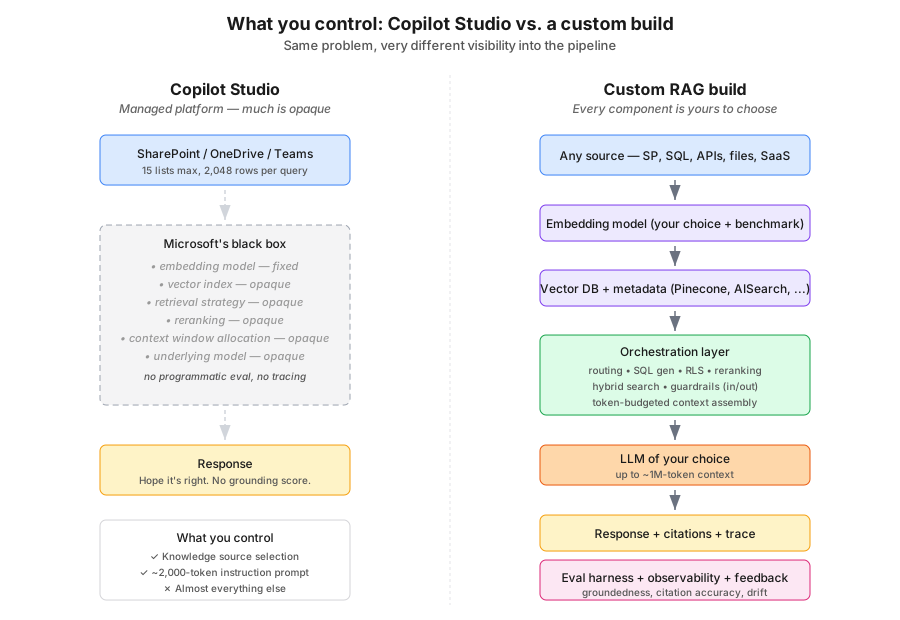
The diagram makes the point that's easy to lose in tables: in Copilot Studio almost every component is opaque to you, while in a custom build every component is a deliberate choice you can benchmark and swap. Both are valid — but you should know which one you're signing up for.
For reference, the full text view of a custom retrieval-based pipeline (one common shape; agentic or Text-to-SQL builds rearrange these blocks):
┌──────────────────────────────────────────────────────────────────────┐
│                       Custom Solution Architecture                   │
│                                                                      │
│  ┌──────────────┐    ┌──────────────┐    ┌────────────────────────┐  │
│  │ Data Sources │    │  Embedding   │    │   Vector Database      │  │
│  │              │    │    Model     │    │   + Metadata Index     │  │
│  │  • SharePoint│───→│              │───→│                        │  │
│  │  • SQL DBs   │    │              │    │  (Azure AI Search /    │  │
│  │  • APIs      │    │              │    │   Pinecone / FAISS /   │  │
│  │  • CSV/Excel │    │              │    │   Chroma / pgvector)   │  │
│  │  • Files     │    │              │    │                        │  │
│  └──────────────┘    └──────────────┘    └────────────┬───────────┘  │
│                                                       │              │
│                                                       │              │
│   User Query                                          │              │
│        │                                              ▼              │
│        │            ┌─────────────────────────────────────────┐      │
│        ├───────────→│        Orchestration Layer              │      │
│        │            │                                         │      │
│        │            │  • Intent classification                │      │
│        │            │  • Query routing / SQL generation       │      │
│        │            │  • Row-level security filtering         │      │
│        │            │  • Hybrid retrieval + reranking         │      │
│        │            │  • Context assembly (token-budgeted)    │      │
│        │            │  • Prompt construction                  │      │
│        │            │  • Guardrails (in / out)                │      │
│        │            └────────────────┬────────────────────────┘      │
│        │                             │                               │
│        │                             ▼                               │
│        │                       ┌─────────────┐                       │
│        │                       │     LLM     │                       │
│        │                       │             │                       │
│        │                       └──────┬──────┘                       │
│        │                              │                              │
│        │                              ▼                              │
│        │                       Response + Citations                  │
│        │                              │                              │
│        ▼                              ▼                              │
│   ┌────────────────────────────────────────────────────────────┐     │
│   │  Eval Harness + Observability + Feedback Loop              │     │
│   │  (golden set, metrics, traces, thumbs, drift monitoring)   │     │
│   └────────────────────────────────────────────────────────────┘     │
└──────────────────────────────────────────────────────────────────────┘
The middle ground: MCP servers
Bottom line: MCP is for moderate-complexity problems where Copilot's connectors aren't enough but you don't want to build a full custom pipeline. Good when you need to wire an LLM to a handful of specific systems with standard-size contexts. Stop being a middle path the moment you need row-level security at scale, dynamic query planning, or a real eval harness — at that point you're already most of the way to custom.
Model Context Protocol (MCP) is an open standard that lets an LLM call out to external tools and data sources through a uniform interface. It sits between "Copilot's built-in connectors" and "we build everything from scratch."
MCP is a good fit when:
- The problem is moderately complex — beyond pure Q&A but not full agentic.
- You need to connect to a handful of specific systems (a CRM, a ticketing tool, an internal API).
- Per-interaction token requirements fit comfortably inside a standard 128K-token model context.
- You have some engineering capacity but not a dedicated ML team.
Where MCP starts to break down: dynamic query planning across many data sources, row-level security at scale, or anything that needs a real evaluation harness wrapped around it. At that point you are already building most of a custom solution; MCP is just the connector layer.
Head-to-head, standardised in tokens
| Dimension | Copilot Studio | Custom |
|---|---|---|
| Time to first version | Hours to days | Weeks to months |
| Skills required | Low-code; business analyst | Python / TypeScript + ML literacy |
| Agent instruction budget | ~2,000 tokens (8,000 chars) | Effectively unlimited; you control the prompt |
| Context window control | Opaque | Full — up to 1,000,000+ tokens with frontier models |
| Multimodal handling | Supported via Azure service integration; chaining breaks the low-code premise | Native + parallel preprocessing |
| External call timeout | ~100 s hard cap per flow | You set it; supports async + streaming |
| Parallel external calls | Synchronous only — no fan-out | Native async, parallel, batched |
| Conversation working memory | Hard cap; cannot store transcripts / OCR / large JSON | Bounded only by your memory and database |
| Max SharePoint lists | 15 / session | Unlimited |
| Max rows per list query | 2,048 | Unlimited |
| Row-level security | Not supported on list data | Fully customisable |
| Multi-step / agentic reasoning | Limited | Fully supported |
| Embedding model choice | Microsoft's (fixed) | Open choice; benchmarkable |
| Evaluation | Manual testing in a side panel | Programmatic, scored against a golden test set, automatable in CI |
| Observability / tracing | Limited; latency debugging requires a separate dashboard | End-to-end traces across every call |
| Error handling | Wired node-by-node on the canvas | One try/except per logical operation |
| Guardrails | Microsoft defaults | Custom layered guardrails |
| Cost model | Per-message licensing + Power Platform request quotas | Compute + API + storage (pay-as-you-go) |
| Compliance / audit posture | Inherited from M365 | Your responsibility — but also your control |
| Maintenance burden | Microsoft manages the platform | Your team owns the lifecycle |
Decision flowchart
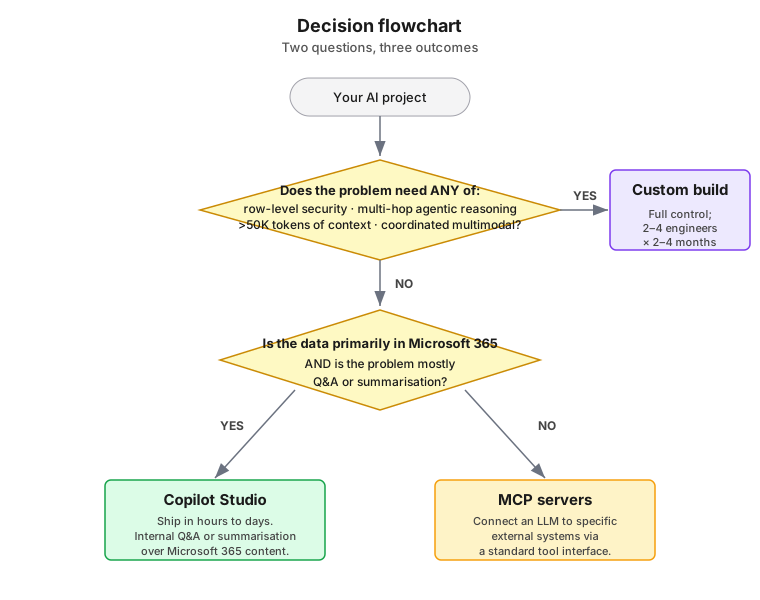
The flowchart collapses the whole guide into two questions. Question 1 is the hard-trigger check — if any of those four conditions apply, custom is the answer regardless of the M365 question. Question 2 only matters if you cleared the first; it separates Copilot's native ground (M365 + Q&A) from problems that need MCP's lightweight system-integration layer.
For more nuanced cases — e.g. you score medium on three axes rather than high on one — fall back to the complexity scoring framework earlier in the guide and the head-to-head comparison table above.
Total cost of ownership — the part the demo never shows
Bottom line: Below ~10,000 interactions per month, Copilot is almost always cheaper. Above ~100,000 interactions per month on a non-trivial problem, custom usually wins on both cost and quality. The crossover band in the middle depends on how much of your team's time you're willing to spend.
A useful exercise before committing: estimate the 18-month TCO of both options, not just the build cost.
Copilot Studio TCO drivers:
- Per-message licensing (varies by tier and usage).
- Microsoft 365 / Copilot licensing per seat.
- Build effort (low).
- Ongoing tuning effort (moderate — content stewardship matters more than you think).
- Cost of a wrong answer (whatever it is for your domain).
- Platform risk: features change, limits move, your agent can stop behaving and you have limited recourse.
Custom solution TCO drivers:
- Build effort (high — typically 2–4 engineers for 2–4 months for a meaningful first version).
- Infrastructure (compute, vector DB, observability, embedding generation).
- API calls (variable; instrument early or be surprised).
- Ongoing engineering ownership (do not pretend this disappears after launch).
- Eval and harness maintenance (a half-engineer ongoing, realistically).
- Lower per-message cost at scale, but only past a meaningful volume crossover.
There is no universal answer. As a rough heuristic: below ~10,000 interactions per month, Copilot is almost always cheaper. Above ~100,000 interactions per month on a non-trivial problem, custom usually wins on both cost and quality. The middle is genuinely contested and depends on how much of your team's time you're willing to commit.
Operating model — who actually owns this thing?
Bottom line: Decide who owns the prompt, the eval set, and the production logs before you pick a platform. Wrong owner + right platform = quiet project death. Copilot pushes ownership toward business power-users; custom pushes it toward engineering. Neither is wrong; the mismatch is what kills projects.
A question that surprisingly few projects answer at kickoff:
- Who owns the prompt when it needs to change next quarter?
- Who owns the golden eval set?
- Who decides when to upgrade the model?
- Who reviews production logs for hallucinations?
- Who pays the API bill?
Copilot Studio pushes most of these towards the business / power-user side. Custom builds push them towards engineering. Neither is wrong, but the wrong choice of operating model for your organisation will quietly kill a technically sound project. Decide this before you pick the platform.
A worked example of complexity scoring
A real project I worked on — useful both as a calibration of how to score, and as a concrete picture of what "custom-build territory" actually looks like once you cross the line.
The requirement: A natural-language assistant over 200+ SharePoint lists containing live project and operations data. Users must only see rows tied to their projects and specific regions (row-level security). The assistant must understand questions like "What's our total committed spend in APAC this quarter?" and return accurate aggregate answers — i.e. generate and execute the SQL equivalent against the right list, not summarise documents.
This is a Text-to-SQL problem with retrieval and RLS layered on top.
Scoring against the six axes
| Axis | Score | Reasoning |
|---|---|---|
| Token volume | High | Each turn injects table metadata, candidate schemas, sample rows, the question, generated SQL, and result set. A single hard question routinely consumes 20–50K tokens of context. |
| Modality | Low | Structured data only. |
| Reasoning depth | Critical | Genuinely multi-hop: retrieve candidate tables → inspect schemas → choose one → generate SQL → apply RLS → execute → format. Four to five tool/LLM calls per user turn. |
| Personalisation | Critical | Row-level security is foundational. APAC sales must never see EMEA numbers, regardless of question phrasing. |
| Latency / scale | Moderate | Internal user base, but real-time response expected. |
| Trust / audit | High | Financial and operational numbers driving business decisions. Wrong answers that look right are the worst possible outcome. |
Five of six axes scored high or critical. This was unambiguously custom-build territory from the start. We attempted Copilot Studio first to honour the preference for the Microsoft-native answer — it took roughly three to four weeks to confirm what the scoring framework had already told us in 30 minutes.
What we actually built
The "200+ tables, pick the right one" problem had to be solved before SQL generation could even start. The pipeline:
- Ingest and index list metadata. Each SharePoint list was extracted and persisted as a table in Azure SQL Database. For every table we stored metadata — table name, business description, column names with descriptions, representative sample values — and embedded that metadata into a vector index.
- Question → candidate tables. The user question is embedded and matched against the metadata index. Top 5 candidate tables come back.
- Schema investigation tool. A dedicated tool fetches the actual schema and a handful of sample rows for each of the top 5 candidates. This grounding step is what stops the LLM from hallucinating column names or inventing tables.
- Table selection. Schemas + sample rows + the original question are passed to a second LLM call whose only job is to pick the single best table for this query.
- SQL generation. A third LLM call generates SQL against the chosen table.
- Row-level security injection. Before execution, the user's identity and region attributes are merged into the WHERE clause programmatically — RLS is enforced in code, not left to the LLM's discretion.
- Execute, validate, format. SQL runs against Azure SQL; results are validated against expected types; the answer is composed for the user with citations back to the table.
- Guardrails on both ends. Input filtering (prompt-injection detection), output filtering (no raw SQL leaking, no rows from outside the user's scope), and structured logs of every step for audit.
That's three-to-four LLM calls and two-to-three tool calls per user turn, coordinated inside an orchestration layer, with RLS enforced deterministically.
Why Copilot Studio could not have done this
Mapping the requirements against the configuration ceilings and runtime constraints documented in the next section:
| What the project needed | Why Copilot Studio could not deliver |
|---|---|
| Index 200+ lists | 15-lists-per-session cap. You can rotate sessions but cannot route across them at runtime. |
| Aggregate across full lists | 2,048-row return cap silently truncates larger lists — aggregate numbers come out wrong but plausible-looking. |
| Multi-hop agentic chain (metadata lookup → schema fetch → table choice → SQL gen → execute) | Synchronous-only external calls plus the ~100-second flow timeout. Three or four sequential LLM/tool calls inside that budget is fragile, on a good day. |
| Pass schemas and sample rows between hops | Conversation state size cap and 28 KB channel payload limit. Microsoft's own guidance is not to store schema-sized JSON in conversation variables. |
| Generate and execute SQL | Copilot Studio cannot execute code. Disastrous. |
| Row-level security on list rows | No native mechanism — Copilot's security model stops at the SharePoint permission level. |
| End-to-end traces across the 4+ hops for debugging | No cross-hop observability — debugging means tabbing between Copilot Studio and the Power Automate dashboard trying to reconstruct timings. |
| Programmatic evaluation of correctness on hundreds of historical questions | No automated evaluation tooling; only manual testing in a side panel. |
The point of this example is not to disparage Copilot Studio. Every constraint we hit was a known platform limit doing exactly what it's supposed to do — Copilot Studio is excellent inside its design envelope. The point is that the complexity scoring would have flagged all of this in half an hour. The time we spent confirming it were the cost of skipping the framework.
Key takeaways — recap
(If you only read the Bottom Line at the top, these reinforce the same points with the reasoning behind them.)
- Score complexity before picking a platform. Six axes — token volume, modality, reasoning depth, personalisation, scale, and trust. If your problem scores high on two or more, Copilot will fight you.
- Standardise on tokens as the unit when comparing options. Mixing characters, rows, and megabytes hides the real constraint, which is always how much information the model can see at once.
- Copilot Studio is excellent at what it was built for — document Q&A, summarisation, drafting, meeting recaps — and shockingly fast to ship. Don't over-engineer simple problems.
- Custom solutions earn their cost on hard problems, not on prestige. The trigger is genuine complexity: row-level security, multimodal data, multi-step reasoning, large context, audit requirements.
- Invest in evaluation from day one. It is the only mechanism that lets you make defensible claims about whether your AI works. Without it, you are guessing.
- MCP is a real middle path for moderate-complexity problems where you want more flexibility than Copilot offers without rebuilding the world.
- Pick an operating model before you pick a platform. Who maintains the prompt, the eval set, and the production logs is more important than which vendor you choose.
The right AI architecture isn't the most sophisticated one available. It's the one calibrated to the actual complexity of the problem, the actual capability of the team that will own it, and the actual cost of getting it wrong.